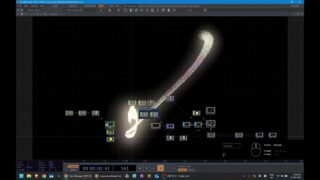
I turned my monitor into a touchscreen | TouchDesigner Tutorial Part I
This is the first video in a 3-part series on using the Slamtec RPLidar A1 to create interactive visuals in TouchDesigner. In this part, we’re focusing on building a particle system controlled by mouse input. We’ll cover the rest in the next parts which I’m going to post in a few days.
I tried to keep the tutorial short and to the point, so I couldn’t go into every detail of why I do certain things. So, if you have any questions regarding building this network, feel free to ask in the comments!
Have fun!:)
—————————————————————————————–
A link to the project file (mouse mode only): https://anyamaryina.gumroad.com/l/interactiveparticles_mouse
—————————————————————————————–
Follow me on social media:
Insta: https://www.instagram.com/anyamaryina
Tiktok: https://www.tiktok.com/@anya_maryina
—————————————————————————————–
Timestamps:
00:00 Intro
00:57 Adding a particle component
05:05 Mouse interaction
07:21 Optical Flow
09:21 Extra Forces
13:50 Material and minor adjustments
15:19 Colors
17:20 Post-processing
18:29 Outro
—————————————————————————————–
Music from the video:
The 129ers – Where Are My Clothes
The Wish – Devon Church
Tiburtina -Schwartzy
Music by Bensound.com/royalty-free-music
License code: KPCZ7HNFDMVNYUNP
Artist: : Diffie Bosman
Track: As Your World Grows Smaller
License code: C6ZOJA2JAXPZMHDB
Artist: : Diffie Bosman
Track: Refract
License code: LSWAY4XJG9LLEUM4
Artist: : Theatre Of Delays
Track: Motion
—————————————————————————————–
#touchdesigner #particles #motiongraphics #interactive #lidar #slamtec
About The Author

![TouchDesigner 3D粒子效果particle GPU [ 練習8-3:音訊與粒子特效練習]](https://alltd.org/wp-content/uploads/2025/11/touchdesigner-3dparticle-gpu-8-3-1-320x180.jpg)
![TouchDesigner 3D粒子效果particle effect 2 [ 練習8-2:線狀發射器]](https://alltd.org/wp-content/uploads/2025/11/touchdesigner-3dparticle-effect-1-320x180.jpg)
![TouchDesigner 3D粒子效果particle effect [ 練習8-1:球形發射器]](https://alltd.org/wp-content/uploads/2025/11/touchdesigner-3dparticle-effect-320x180.jpg)
![TouchDesigner 3D粒子效果particle GPU [ 練習8-3:音訊與粒子特效練習]](https://alltd.org/wp-content/uploads/2025/11/touchdesigner-3dparticle-gpu-8-3-320x180.jpg)